Our Short List of 3

- Best for: one main Windows or Mac desk where backlighting, quiet keys and fast switching between a computer and a tablet matter most.

- Best for: a single-computer desk where you want mechanical feel, remapping and switch swapping in a small footprint, and you do not mind a cable.
- Best for: people who answer messages on a phone or tablet while working at a computer and want one quiet, full-size board to type on all three.
All 5 Picks at a Glance
| Product | Specs | Action |
|---|---|---|
| Logitech MX Keys S — backlit full-size board for a main desk |
| Check price on Amazon |
| Keychron V1 — compact wired mechanical board you can tune |
| Check price on Amazon |
| Logitech K780 Multi-Device — one board for computer, phone and tablet |
| Check price on Amazon |
 Logitech Ergo K860 — split ergonomic board for long typing days |
| Check price on Amazon |
 Logitech K400 Plus — keyboard and touchpad for a PC-connected TV |
| Check price on Amazon |
Key takeaways
- Five personal keyboards compared for everyday home typing, from the backlit Logitech MX Keys S and split Ergo K860 to the compact Keychron V1, with full specs.
As an Amazon Associate, we earn from qualifying purchases made through links on this page.
A personal keyboard is the one board that belongs to you alone: it sits on your own desk, pairs with your own laptop, tablet or living-room PC, and handles everything from long email sessions and documents to browsing from the sofa. Unlike a shared office board or a specialised gaming deck, a good personal keyboard has to balance comfort, size, connection type and battery habits around one person’s routine.
This guide compares five current, widely sold computer keyboards that cover the main personal-use styles. The Logitech MX Keys S is a full-size wireless board with smart backlighting for a main desk. The Keychron V1 is a compact wired mechanical board for people who like to tune their typing feel. The Logitech K780 adds a built-in cradle so a phone or tablet becomes part of the same typing setup. The Logitech Ergo K860 uses a split, curved frame for people who type for hours and want a more natural hand position. Finally, the Logitech K400 Plus combines keys and a touchpad in one light unit built for a PC connected to a TV. Every specification below comes from the manufacturer or the product listing, and each pick is a computer keyboard of the same general type, chosen for a different personal routine.
What to look for in a personal keyboard
Layout and size. Full-size boards keep a number pad and wide key spacing, which suits spreadsheet work and long documents, but they take up the most desk room. Compact layouts such as a 75 percent board drop the number pad and pull the arrow keys in close, leaving space for a mouse and a notebook. Split ergonomic frames change hand position rather than size, and they ask for an adjustment period. Measure your desk and think about whether a number pad is part of your daily work before choosing.
Connection type. Bluetooth boards pair directly with laptops, tablets and phones and keep ports free. Boards with a USB receiver, such as Logitech Unifying or Logi Bolt models, connect the moment the receiver is plugged in and tend to wake more reliably, but they occupy a USB port. A wired USB-C board never needs charging and never drops its link, at the cost of a cable across the desk. Many personal setups benefit from a board that can hold two or three pairings and switch between them with one key.
Typing feel. Low-profile scissor keys, as on the MX Keys S and K780, are quiet and need little finger travel. Mechanical switches, as on the Keychron V1, give a deeper press and can be swapped if you later want a different feel. Neither approach is better for everyone; it depends on whether you value quiet, shallow keystrokes or a firmer, customisable press.
Power habits. Rechargeable boards such as the MX Keys S charge over USB-C but need a cable every few weeks when the backlight is on. Boards running on replaceable AAA or AA cells, such as the K780, K860 and K400 Plus, can run for many months per set, which suits people who dislike charging cables. Backlighting is the single biggest drain on any board that has it.
Compatibility and extras. Check that the printed legends and the function row match your system, Windows, macOS or ChromeOS, and note extras that fit your routine: a device cradle, a built-in touchpad, programmable keys, or a wrist rest. These details decide how well a board fits one person’s habits, which is the whole point of a personal keyboard.
Logitech MX Keys S — backlit full-size board for a main desk
- Best for: one main Windows or Mac desk where backlighting, quiet keys and fast switching between a computer and a tablet matter most.
one main Windows or Mac desk where backlighting, quiet keys and fast switching between a computer and a tablet matter most.
The MX Keys S (model 920-011558, Graphite) is Logitech’s flagship low-profile keyboard for one person’s main computer. It is a full-size board with a number pad, measuring 430.8 by 131.6 by 20.5 mm and weighing 810 g, with spherically dished keys that centre your fingertips on each cap. The backlighting reacts as your hands approach and adjusts its brightness to the room, and Logitech rates the internal battery at up to 10 days with the backlight on, or up to five months with it off, charging over USB-C.
For personal use, the strongest points are the pairing options and the software. The board connects over Bluetooth Low Energy or the included Logi Bolt USB receiver, holds three devices at once, and moves between them with Easy-Switch keys. In the Logi Options+ app you can assign Smart Actions, short macros that chain several steps into one keypress, and remap the function row. The metal top plate keeps the slim body rigid, and the keys stay quiet enough for a shared room or a late-night session.
The limits follow from the design. The switches are fixed scissor mechanisms, so there is no way to change the typing feel later. The low, fixed typing angle has no flip-out feet for people who like a raised board. The backlight that makes it pleasant in dim rooms is also what cuts battery time from months to days, and the Logi Bolt receiver takes a USB port if you do not use Bluetooth.
Keychron V1 — compact wired mechanical board you can tune
- Best for: a single-computer desk where you want mechanical feel, remapping and switch swapping in a small footprint, and you do not mind a cable.
a single-computer desk where you want mechanical feel, remapping and switch swapping in a small footprint, and you do not mind a cable.
The Keychron V1 is a 75 percent wired mechanical keyboard with 82 keys, a function row and dedicated arrow keys packed into a frame of 328.5 by 148.7 mm. This listing is the Carbon Black version with Keychron K Pro Brown tactile switches. The switches sit in hot-swappable sockets that accept most 3-pin and 5-pin MX-style switches, so you can change the feel of one key or the whole board without soldering. Under the switches there is a steel plate, a tray-mount case and screw-in PCB stabilisers.
Personalisation is the theme. The board runs QMK firmware and is configured in VIA, which means any key can be remapped and macros can be stored on the board itself rather than in background software. Keychron fits double-shot PBT keycaps in its OSA profile, adds south-facing RGB lighting, and includes both macOS and Windows keycaps plus a switch and keycap puller in the box. The wired USB-C link polls at 1000 Hz with full key rollover, which keeps it dependable for fast typists.
The trade-offs are clear in the spec sheet. The V1 is wired only, so there is no Bluetooth for a tablet and no cable-free desk. The compact layout has no number pad, which slows heavy number entry. There is no wrist rest in the box, and the stock PBT caps are not shine-through, so the RGB glow stays around the keys rather than lighting the legends.
Logitech K780 Multi-Device — one board for computer, phone and tablet
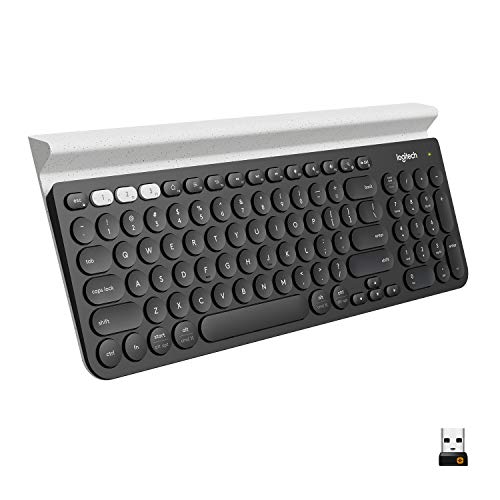
- Best for: people who answer messages on a phone or tablet while working at a computer and want one quiet, full-size board to type on all three.
people who answer messages on a phone or tablet while working at a computer and want one quiet, full-size board to type on all three.
The K780 (model 920-008025) is a full-size wireless keyboard built around a simple personal habit: typing on several screens without reaching for each one. A rubber cradle runs along the top of the board and holds a phone or tablet upright at a reading angle, supporting devices up to 11.4 mm thick. Easy-Switch keys move your typing between three paired devices, a computer, a phone and a tablet, over Bluetooth Smart or the included Unifying USB receiver.
The board itself uses Logitech’s Perfect Stroke keys, round-topped and quiet, with a full number pad and a layout printed for Windows, macOS, ChromeOS, Android and iOS. It also supports Logitech Flow when used with a compatible mouse, letting you move the cursor and copied text between two computers. Two AAA batteries, included in the box, are rated for up to 24 months, and the board measures 380 by 158 mm and weighs 875 g, the weight coming largely from the cradle structure that keeps propped-up tablets steady.
Its limits are modest but real. There is no backlighting, so dim-room typing relies on screen glow. The batteries are replaceable rather than rechargeable, which some people prefer and others count as a chore. The cradle angle is fixed, and very thick tablet cases may not sit in the slot.
Logitech Ergo K860 — split ergonomic board for long typing days
- Best for: people who type for most of the working day at one desk and want a split layout, wrist support and multi-device switching in a single board.
people who type for most of the working day at one desk and want a split layout, wrist support and multi-device switching in a single board.
The Ergo K860 (model 920-009166) is a full-size wireless keyboard built around a curved, split keyframe that places your hands, wrists and forearms in a more natural alignment than a flat board. The cushioned wrist rest uses memory foam under a stain-resistant fabric surface, and the front of the board can be tilted with adjustable palm lift settings of 0, minus 4 and minus 7 degrees, including a raised option for standing desks. Logitech’s Perfect Stroke keys keep the same quiet, scooped feel as its other personal boards.
Day-to-day details are practical. It connects over Bluetooth Low Energy or the Unifying USB receiver, switches between three devices, and runs for up to two years on two AAA batteries. The layout keeps the number pad and a full function row, and the board measures 456 by 233 by 48 mm and weighs 1160 g, so it is a committed piece of desk furniture rather than something you slide into a drawer.
The size is the main limitation: the split frame and deep wrist rest need a wide, clear desk. The split layout also changes the position of the inner keys, so touch typists face an adjustment period while their hands relearn the centre of the board. There is no backlighting and no rechargeable battery, and the wrist rest is fixed to the frame rather than detachable.
Logitech K400 Plus — keyboard and touchpad for a PC-connected TV
- Best for: a home theatre PC or any computer connected to a TV, where one light board with its own touchpad replaces a separate keyboard and mouse.
a home theatre PC or any computer connected to a TV, where one light board with its own touchpad replaces a separate keyboard and mouse.
The K400 Plus (model 920-007119) is a compact wireless keyboard with a built-in 3.5-inch touchpad, made for controlling a computer from a sofa rather than a desk. Its 84-key layout adds media controls and a left mouse button at the top-left corner, so you can hold the board with one hand and click with the other. It measures 354.3 by 139.7 by 23.5 mm and weighs 390 g, light enough to live on a coffee table.
Connection is through the included Unifying USB receiver on the 2.4 GHz band, with a rated range of 10 metres, or 33 feet, which covers a typical living room. Two pre-installed AA batteries are rated for up to 18 months, and an on/off switch helps when the board sits unused. It works with Windows, Android and ChromeOS systems, and the plug-and-play receiver means there is no pairing menu to manage on a media PC, a small streaming box or a spare laptop attached to the TV.
The limits match the living-room brief. There is no Bluetooth, so the host device needs a USB port for the receiver. The keys are not backlit, which can make the legends hard to read in a dark room. The compact layout drops the number pad and squeezes some keys, and the touchpad, while handy, is smaller than a desk mouse for detailed pointer work.
Comparison table
| Keyboard | Layout | Connection | Power | Standout feature |
|---|---|---|---|---|
| Logitech MX Keys S | Full-size, low profile | Bluetooth, Logi Bolt receiver | USB-C rechargeable | Smart backlighting, Smart Actions macros |
| Keychron V1 | 75 percent, 82 keys | Wired USB-C | No battery | Hot-swappable switches, QMK/VIA remapping |
| Logitech K780 | Full-size with cradle | Bluetooth, Unifying receiver | 2 AAA, up to 24 months | Built-in phone and tablet cradle |
| Logitech Ergo K860 | Full-size split, curved | Bluetooth, Unifying receiver | 2 AAA, up to 2 years | Split frame, cushioned wrist rest, palm lift |
| Logitech K400 Plus | Compact, 84 keys, touchpad | Unifying receiver, 2.4 GHz | 2 AA, up to 18 months | Built-in touchpad for TV-connected PCs |
Frequently asked questions
What counts as a personal keyboard?
It is a computer keyboard bought for one person’s own setup rather than a shared or specialised station. The deciding factors are personal: your desk size, the devices you pair with, how long you type each day, and whether you prefer quiet low-profile keys or mechanical switches.
Should a personal keyboard be wired or wireless?
Wireless boards such as the MX Keys S, K780 and K860 keep a desk clear and can switch between a computer, tablet and phone. A wired board such as the Keychron V1 never needs charging and keeps a constant link. For a single fixed desk, either works; for several devices or a sofa setup, wireless is the practical choice.
Do these keyboards work with both Windows and Mac computers?
Yes, with small differences. The MX Keys S, K780 and K860 print or detect layouts for Windows and macOS, and the Keychron V1 includes both Windows and Mac keycaps in the box. The K400 Plus is aimed at Windows, Android and ChromeOS, so Mac users should look at the other four.
Is a split keyboard like the Ergo K860 hard to get used to?
The split frame moves the inner keys apart, so there is an adjustment period while your hands learn the new centre positions. The layout, number pad and function row stay familiar, and the wrist rest and palm lift are passive features that need no learning at all.
Can one keyboard really serve a laptop, a tablet and a phone?
The MX Keys S, K780 and K860 each hold three pairings and switch with a dedicated key. The K780 goes one step further with its cradle, which holds the phone or tablet at a readable angle while you type on it.
Conclusion
The right personal keyboard depends on the shape of your day. For a main desk, the Logitech MX Keys S pairs quiet backlit keys with fast device switching. For a smaller desk and a practical approach, the Keychron V1 adds mechanical switches you can swap and keys you can remap. The Logitech K780 suits anyone whose phone and tablet are part of the typing routine, the Ergo K860 supports people who type for hours and want a split, cushioned layout, and the K400 Plus covers the sofa, where a touchpad matters more than a number pad. Match the layout, connection and power style to your own habits and any of the five will serve as a dependable everyday board.