Our Short List of 3
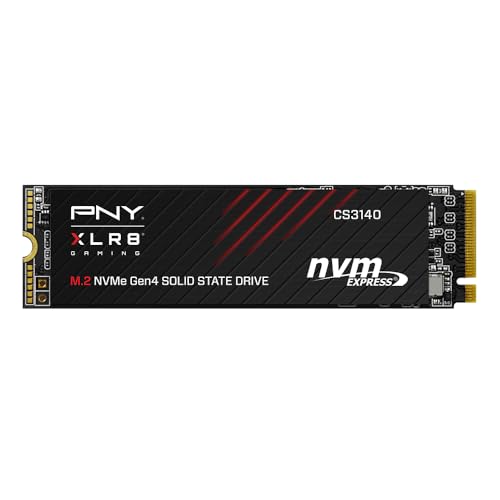
- Best for: Gen4 gaming PCs and PS5 owners wanting PNY’s fastest internal drive.
- Capacity: 1TB
- Form factor: M.2 2280
- Interface: PCIe Gen4 x4 NVMe
- Sequential read: up to 7,500MB/s

- Best for: Mainstream Gen4 desktops and laptops needing a roomy, quick system drive.
- Capacity: 1TB
- Form factor: M.2 2280
- Interface: PCIe Gen4 x4 NVMe
- Sequential read: up to 5,100MB/s

- Best for: Gen3 laptops and desktops replacing a small or ageing NVMe drive.
- Capacity: 1TB
- Form factor: M.2 2280
- Interface: PCIe Gen3 x4 NVMe
- Sequential read: up to 2,100MB/s
All 5 Picks at a Glance
| Product | Specs | Action |
|---|---|---|
| PNY XLR8 Gaming CS3140 1TB |
| Check price on Amazon |
| PNY CS2241 1TB |
| Check price on Amazon |
| PNY CS1030 1TB |
| Check price on Amazon |
 PNY CS900 500GB |
| Check price on Amazon |
 PNY RP60 1TB Portable SSD |
| Check price on Amazon |
Key takeaways
- Compare the best PNY SSDs for laptops, gaming PCs, consoles and travel, from simple SATA upgrades to fast Gen4 NVMe and a rugged portable drive.
Choosing a PNY drive starts with the slot or port your machine actually has, because the range covers three different shapes that do not interchange. A 2.5-inch SATA model revives an older laptop, an M.2 stick needs the right PCIe generation to reach its stated speeds, and a portable drive skips installation entirely. Capacity, interface and form factor matter more here than the badge on the box.
This guide is for laptop owners replacing a hard drive, desktop builders adding fast game storage, console players expanding a library, and anyone who moves large files between machines. Every pick below is a PNY SSD chosen from the names and specifications printed on its Amazon product page, and the range runs from an easy SATA swap to a rugged USB-C portable.
Quick Picks
As an Amazon Associate we earn from qualifying purchases.
| Product | Best for | Key spec from title |
|---|---|---|
| PNY XLR8 Gaming CS3140 1TB | Gen4 gaming PCs and PS5 storage | PCIe Gen4 x4, up to 7,500MB/s read |
| PNY CS2241 1TB | Mainstream Gen4 desktops and laptops | PCIe Gen4 x4, up to 5,100MB/s read |
| PNY CS1030 1TB | Gen3 laptops needing a roomy upgrade | PCIe Gen3 x4, up to 2,100MB/s read |
| PNY CS900 500GB | Older machines with a 2.5-inch SATA bay | SATA III, up to 550MB/s read |
| PNY RP60 1TB Portable SSD | Moving files between machines on the go | USB 3.2 Gen2x2, up to 2,000MB/s read |
How to Choose
Match the Form Factor to Your Machine
Start with the physical fit, because no speed figure helps if the drive cannot be installed. Older laptops and many budget desktops accept a 2.5-inch SATA drive like the CS900, which swaps directly for a spinning hard drive using the same cables and bay. Newer systems use an M.2 slot, and most of the sticks in this guide are the common 2280 length. Ultrabooks sometimes take shorter cards, and some slim machines have soldered storage that cannot be changed at all. Check your model’s service manual or spec sheet for the slot type and length before ordering anything.
Pick the Right Interface Generation
The interface sets the ceiling for transfer speeds, and PNY sells near-identical looking sticks across three generations. SATA III tops out around the CS900’s stated figures, which still feels like a large step up from a hard drive. A PCIe Gen3 x4 slot suits the CS1030, while Gen4 x4 boards can use the faster CS2241 and CS3140 at their full stated rates. A Gen4 drive usually still works in a Gen3 slot, only at the older slot’s ceiling, so buying ahead for a future build can make sense. Confirm which generation your motherboard or laptop provides before paying for speed you cannot use yet.
Choose Capacity for How You Actually Store Files
Capacity decides how often you will be deleting things later. A 500GB drive like the CS900 suits a single operating system, office software and a modest photo library, and it is the sensible size for reviving a secondary machine. The 1TB models in this guide fit a working game library, a season of video projects or a large music collection without constant tidying. Think about your biggest folder today, then leave headroom for a year of growth. Remember that the formatted capacity shown by your operating system will read lower than the number printed on the box.
Decide Between Internal and Portable Storage
An internal drive becomes part of one machine, starts up with it and stays out of the way, which suits a system drive or a fixed game library. A portable SSD like the RP60 trades that permanence for flexibility: it plugs into laptops, desktops and consoles in turn, and its stated speeds depend on the host port supporting USB 3.2 Gen2x2. Portable storage also doubles as a quick way to move a project between home and office without uploading it anywhere. Many buyers end up with one of each, using the internal drive daily and the portable for transfers and backups.
The 5 Best Options
PNY XLR8 Gaming CS3140 1TB
- Best for: Gen4 gaming PCs and PS5 owners wanting PNY’s fastest internal drive.
- Capacity: 1TB
- Form factor: M.2 2280
- Interface: PCIe Gen4 x4 NVMe
- Sequential read: up to 7,500MB/s
Gen4 gaming PCs and PS5 owners wanting PNY’s fastest internal drive.
PS5 installs need a heatsink that fits the console bay, so confirm whether your chosen variant includes one.
This is the flagship stick in PNY’s range and the one aimed at Gen4 gaming rigs and PlayStation 5 expansion. Its stated read speed is the highest in this guide, and the listing positions it for gaming, photo and video rendering, and workstations. If your motherboard has a Gen4 x4 slot and you regularly move large game installs or project files, this is the PNY drive built for that workload. Buyers with older Gen3 boards will not see its full stated rates, so it earns its place mainly in current-generation systems.
PNY CS2241 1TB
- Best for: Mainstream Gen4 desktops and laptops needing a roomy, quick system drive.
- Capacity: 1TB
- Form factor: M.2 2280
- Interface: PCIe Gen4 x4 NVMe
- Sequential read: up to 5,100MB/s
Mainstream Gen4 desktops and laptops needing a roomy, quick system drive.
In a Gen3-only slot it runs at Gen3 ceilings, so check your board’s slot generation first.
The CS2241 sits in the middle of the range: a Gen4 x4 stick with stated speeds well above any Gen3 model, aimed at mainstream desktops and laptops rather than flagship builds. It is a good match for a recent mid-range motherboard where the CS3140’s extra pace would rarely show in everyday loading and saving. The 1TB capacity fits a working game library plus creative software, and the standard 2280 length suits most desktop boards and many laptops. For a balanced Gen4 upgrade under the PNY name, this is the straightforward pick.
PNY CS1030 1TB
- Best for: Gen3 laptops and desktops replacing a small or ageing NVMe drive.
- Capacity: 1TB
- Form factor: M.2 2280
- Interface: PCIe Gen3 x4 NVMe
- Sequential read: up to 2,100MB/s
Gen3 laptops and desktops replacing a small or ageing NVMe drive.
Some older M.2 slots are SATA-only, and this NVMe drive will not work in one, so verify the slot type.
Plenty of laptops from the last several years have an M.2 slot wired for PCIe Gen3, and the CS1030 is PNY’s answer for those machines. Its stated speeds are modest beside the Gen4 models above, yet they are roughly four times what a SATA drive manages, which is a clear step up for boot times and application loading. The full 1TB capacity also helps owners who are replacing a small original stick rather than a hard drive. If your laptop’s manual lists NVMe Gen3 support, this is the natural fit in the PNY line.
PNY CS900 500GB
- Best for: Older laptops and desktops with a 2.5-inch SATA bay and no M.2 slot.
- Capacity: 500GB
- Form factor: 2.5-inch
- Interface: SATA III
- NAND: 3D NAND
Older laptops and desktops with a 2.5-inch SATA bay and no M.2 slot.
Slim laptops sometimes need a thinner drive spacer or a specific bay height, so measure the existing drive before ordering.
The CS900 is the simplest upgrade in this guide: a 2.5-inch SATA drive that drops into the bay of an older laptop or desktop in place of a hard drive. Its stated speeds sit at the practical ceiling of the SATA III interface, and the 3D NAND design is positioned for everyday users, creators and gamers refreshing everyday machines. At 500GB it suits an operating system, work software and a moderate file library. For a machine with no M.2 slot at all, this is the PNY option that still delivers the solid-state responsiveness people expect.
PNY RP60 1TB Portable SSD
- Best for: Moving large photo, video and game files between machines without opening any of them.
- Capacity: 1TB
- Interface: USB-C, USB 3.2 Gen2x2
- Sequential read: up to 2,000MB/s
- Sequential write: up to 1,800MB/s
Moving large photo, video and game files between machines without opening any of them.
Full stated speeds require a USB 3.2 Gen2x2 host port, which many laptops still lack, so check your ports first.
The RP60 is the one pick here that never gets installed. It is a rugged external drive with a USB-C connection, an IP65 rating for water and dust resistance, and drop protection stated up to three metres, plus a clip loop for attaching it to a bag. Its headline speeds need a host with a USB 3.2 Gen2x2 port; on older USB ports it still works, just at lower rates. Photographers, video editors and anyone shuttling projects between a desk machine and a laptop will get the most from it.
Which One Fits Your Situation
You Are Reviving an Older Laptop
If the machine has a spinning hard drive in a 2.5-inch bay and no M.2 slot, the CS900 is the pick. It uses the same SATA connection as the drive it replaces, so the swap is simple, and its stated speeds reach what that interface allows. A 500GB capacity suits a fresh operating system install and everyday software. Machines this old rarely benefit from anything faster, because the interface itself is the limit.
You Built a Recent Gaming PC
A current motherboard with a Gen4 x4 slot can use either Gen4 stick here. Choose the CS3140 if you move large game installs often and want the highest stated speeds PNY offers, or the CS2241 for a mainstream build where everyday loading matters more than peak transfers. Both are 1TB, which holds a healthy library. Add a motherboard heatsink if your board does not already cover the M.2 slot.
Your Laptop Has a Gen3 M.2 Slot
Many laptops sold with NVMe storage are wired for Gen3, and the CS1030 matches that ceiling while doubling or tripling the capacity of a typical original drive. It is the sensible replacement when the existing stick is nearly full or the machine feels slow to start. Confirm the slot accepts NVMe rather than SATA-only M.2 drives, since the two share a shape but not a language.
You Move Files Between Several Machines
The RP60 avoids installation altogether and works with whatever you plug it into, which suits shared workstations, a mix of home and office computers, or handing a project to a collaborator. Its rugged shell and clip loop suit bag duty, and the 1TB capacity holds a serious project archive. Just remember its fastest stated rates need a Gen2x2 port on the host machine.
Common Mistakes
- Buying an M.2 NVMe drive for a machine whose M.2 slot only supports SATA, or which has no M.2 slot at all.
- Paying for Gen4 speeds when the motherboard or laptop only provides a Gen3 slot, then blaming the drive for the lower rates.
- Choosing 500GB for a game library that already fills most of that space, leaving no headroom for updates and new installs.
- Forgetting a heatsink or thermal pad on a fast Gen4 stick in a tight laptop chassis or a PlayStation 5 bay.
- Expecting a portable drive’s headline speed on any USB port, when the fastest stated rates need a specific Gen2x2 host connection.
Frequently Asked Questions
Will a Gen4 PNY SSD work in a Gen3 slot?
Usually yes, because PCIe generations are designed to work across versions, and the drive simply runs at the slower slot’s ceiling. A CS2241 or CS3140 in a Gen3 slot performs much like a Gen3 drive. That can still be a sensible purchase if you plan a motherboard upgrade later, but there is no speed benefit until the rest of the system catches up.
Can I use the CS3140 in a PlayStation 5?
The listing positions the CS3140 for PS5 use, and its stated read speed clears the console’s requirement. The practical check is cooling and fit: the PS5 expansion bay needs a heatsink within a strict height limit. Confirm whether the variant you order includes a heatsink and that its dimensions match the bay before you buy, and keep the console’s own instructions beside you during installation.
How do I move my existing system onto a new PNY drive?
Most people either clone the old drive with disk-copy software or install the operating system fresh and copy files across. Cloning keeps your setup intact and needs the new drive connected during the process, sometimes through a USB enclosure. A fresh install takes longer but clears out years of clutter. Either way, back up anything irreplaceable first, because both routes rewrite the target drive completely.
Why does my new drive show less capacity than the box states?
Drive makers count capacity in decimal units, while operating systems report in binary units, so a 1TB drive appears as a smaller figure on screen even though nothing is missing. Formatting and system partitions take a little more space. The gap is expected on every brand of drive, and it does not indicate a fault with your PNY SSD or a reason to return it.