Our Short List of 3
All 4 Picks at a Glance
| Product | Specs | Action |
|---|---|---|
 Canon Color imageCLASS MF753Cdw II | Check price on Amazon | |
 Canon imageCLASS MF465dw II | Check price on Amazon | |
 Canon imageCLASS LBP246dw II | Check price on Amazon | |
 Canon imageCLASS MF462dw II | Check price on Amazon |
Key takeaways
- Discover the best Canon workhorse printers for busy offices. Compare durable laser all-in-ones built for heavy daily printing, scanning, and faxing.
A workhorse printer is the machine a busy office leans on day after day without a second thought. It wakes up fast, chews through long documents, scans a stack of signed forms in one pass, and keeps going when the queue is still growing at the end of the afternoon. Canon built its reputation in this space on the imageCLASS line, a family of laser printers designed for small offices and workgroups that print in volume. The models in this guide share the traits that matter most: fast output, large paper capacity, automatic two-sided printing and scanning, and sturdy construction that tolerates a heavy daily workload.
Choosing among them comes down to a few honest questions: do you need color, or will black-and-white pages cover the work? Must the machine also scan, copy, and fax, or is printing alone enough? How many pages does the office produce each month, and how much desk space can the printer claim? The four current imageCLASS models below answer those questions in different ways, each built for sustained use rather than occasional printing.
As an Amazon Associate, we earn from qualifying purchases.
Quick Answer
The best Canon workhorse printer for most busy offices is the Canon Color imageCLASS MF753Cdw II, a color laser all-in-one that prints at up to 35 pages per minute with duplex scanning, a 50-sheet feeder, and paper capacity expandable to 850 sheets. If color is unnecessary, the monochrome MF462dw II and MF465dw II offer faster black-and-white output, while the single-function LBP246dw II suits offices that only need reliable printing.
How to Choose
Start with color. A color laser printer costs more to buy and to feed, but it earns its place in any office that produces client-facing documents, charts, presentations, or forms where color carries meaning. If every page the office prints is text, a monochrome machine delivers the same speed and reliability with simpler running costs and fewer supplies to manage. There is no point paying for color the office never uses, and no workaround when a monochrome printer is asked to produce a color chart.
Next, decide how many functions the machine must handle. An all-in-one that prints, scans, copies, and faxes replaces four devices with one, which matters in a small office where desk space and power outlets are limited. A single-function printer makes sense only when scanning and copying already happen elsewhere, for example on a dedicated scanner. Offices that digitize signed paperwork, archive invoices, or send faxes regularly will use the all-in-one functions every day, so the extra capability is rarely wasted.
Print speed is the number most buyers look at first, but paper handling decides whether a fast printer actually feels fast. A machine rated at 40 pages per minute still stops the work if its tray holds only a small stack. Look for a standard cassette of at least 250 sheets, a multipurpose tray for envelopes and letterhead, and the option to add a second cassette later. A duplex automatic document feeder, which scans both sides of a page in one pass, saves real time on multi-page contracts and forms.
Monthly volume is the figure that separates a workhorse from a home printer wearing office clothes. Canon publishes a recommended monthly page volume for each imageCLASS model, and staying inside that range keeps wear, jams, and service calls low. An office printing several thousand pages a month should pick the model with the highest duty rating and the largest standard paper capacity. Toner yield matters too: high-capacity cartridges cost more up front but need replacing far less often.
Connectivity is easy to overlook and annoying to fix later. Every model here offers Wi-Fi, wired Ethernet, and USB, plus mobile printing through the Canon PRINT app and AirPrint. Wired Ethernet is worth using in a shared office because it keeps the printer available to everyone without depending on wireless signal strength. A large color touchscreen also helps, since it makes copying, scanning, and checking toner levels simple for anyone who walks up to the machine.
Finally, think about size and weight. Workhorse laser printers are heavy, often weighing more than 40 pounds, and they need a sturdy table with room for the paper trays to open and the feeder lid to lift. Measure the space before ordering, including clearance behind the machine for cables and ventilation. A printer that fits the workload but not the desk will cause trouble from the first day.
Canon Color imageCLASS MF753Cdw II
The MF753Cdw II is the most complete machine in this guide and the best choice for an office that wants one printer to do everything in color. It prints, scans, copies, and faxes, producing sharp color and black-and-white documents at up to 35 pages per minute with a first page in about seven seconds. That combination of speed and versatility makes it the default pick for a small office, a hybrid workplace, or a home office that handles client work.
Paper handling is where this model earns the workhorse label. The standard setup holds 250 sheets in the cassette and 50 sheets in the multipurpose tray, and an optional cassette expands total capacity to 850 sheets, so long print runs finish without a refill. The 50-sheet duplex automatic document feeder scans both sides of a page in one pass, turning a stack of double-sided contracts into digital files quickly. Automatic two-sided printing is standard, saving paper on every long document.
The 5-inch color touchscreen keeps daily operation simple: staff can start a copy, send a scan to a computer or email, or check toner levels without opening an app. Connectivity covers Wi-Fi, Gigabit Ethernet, USB, and Wi-Fi Direct, and it uses Canon Genuine Toner 069 cartridges, with high-capacity 069 H options for offices that print in volume. Canon backs the machine with a 3-year limited warranty, longer coverage than most printers in this class carry.
This is a substantial machine at around 50 pounds, so it belongs on a solid surface in a fixed spot. Offices that print mostly in black and white may find the color capability underused, but for any workplace that produces presentations, marketing material, or color forms, the MF753Cdw II is the strongest all-round Canon workhorse available right now.
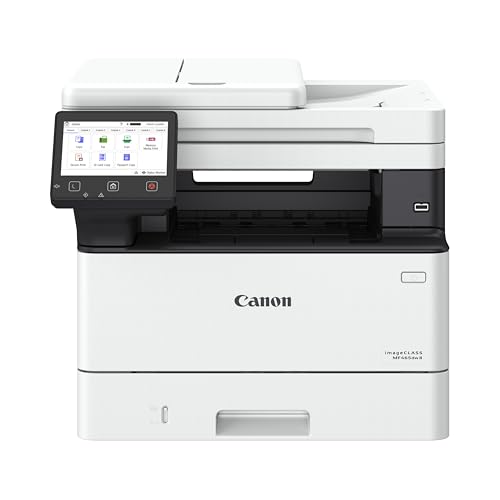
Canon imageCLASS MF465dw II
The MF465dw II is the monochrome counterpart to the color flagship, built for offices where every document is black and white and speed matters more than color. It is a laser all-in-one that prints, scans, copies, and faxes, with a faster monochrome engine than the color model above. For a law office, an accounting practice, a medical office, or any workplace that produces long text documents, invoices, and forms, this is the more focused and more economical choice.
Its strength is sustained monochrome output. Text prints are crisp and dark, and the machine moves through multi-page reports without hesitation. Automatic two-sided printing keeps paper use down, and the duplex automatic document feeder handles double-sided originals in a single pass, which matters when the office scans signed agreements or tax paperwork in batches. The standard paper cassette and multipurpose tray cover everyday volumes, and an optional cassette lets offices load a full ream and refill less often.
Operation follows the same pattern as the rest of the current imageCLASS line. A color touchscreen gives quick access to copy and scan functions, and connectivity includes Wi-Fi, wired Ethernet, and USB, with mobile printing support for phones and tablets. Because it prints only in black, there is a single toner cartridge to track and replace, which simplifies supply management. High-capacity toner options extend the interval between replacements, a detail that matters in a shared office.
The MF465dw II suits buyers who know their workload. If the office prints hundreds of pages of text a week and rarely needs a color page, this machine delivers the speed and durability of the workhorse line without the cost of color supplies. It is a poor fit only for offices that produce charts or color-coded documents, where a monochrome page simply cannot do the job.
Canon imageCLASS LBP246dw II
The LBP246dw II takes a different approach from the all-in-ones in this guide: it prints, and it prints well, without spending size, weight, or cost on scanning and copying hardware. For an office that already has a scanner, a single-function printer is the cleaner choice. It is also the most affordable way into the workhorse line, which matters when the budget has to cover several machines.
As a dedicated monochrome laser printer, the LBP246dw II is built around throughput. It produces sharp black-and-white pages at up to 40 pages per minute, with automatic two-sided printing that halves paper use on long documents. The 250-sheet standard cassette handles a full ream, and the multipurpose tray takes envelopes, labels, and letterhead without unloading the main tray. Wi-Fi, wired Ethernet, and USB connectivity let it serve as a shared network printer for a small workgroup, and mobile printing support means staff can send jobs from phones and tablets.
The practical advantage of a single-function machine is simplicity. There is no feeder lid to lift, no scan glass to keep clean, and no fax line to configure. The printer has fewer moving parts to wear out and fewer settings for users to get wrong, which means fewer interruptions in a busy office. It also takes up less space than an all-in-one, which helps in a crowded work area.
The trade-off is obvious. If the office later needs to scan or copy, this machine cannot help, and buying a separate scanner costs more than choosing an all-in-one in the first place. Pick the LBP246dw II only when scanning and copying are genuinely handled elsewhere. For that setup, it is a dependable, fast, and uncomplicated workhorse.
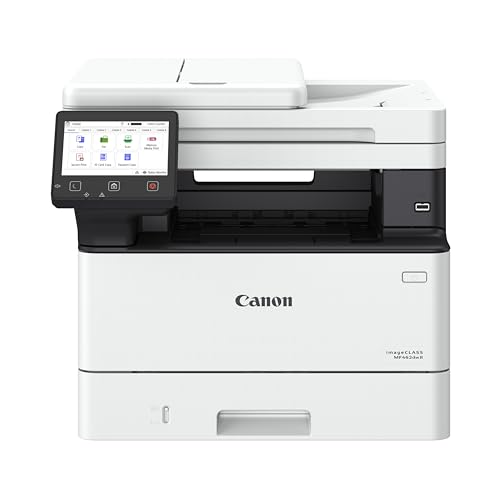
Canon imageCLASS MF462dw II
The MF462dw II is the value pick of the workhorse line: a monochrome laser all-in-one that covers print, scan, copy, and fax at a lower cost than its faster siblings, while keeping the features a busy small office actually uses. It prints at up to 37 pages per minute with a first page in about five seconds, so short jobs finish quickly and long jobs move steadily. For a home office or a small team that prints in volume but does not need color, it is a well-judged balance of capability and cost.
Its paper handling matches the rest of the line. A 250-sheet cassette and a 100-sheet multipurpose tray hold enough paper for a full working day, and an optional cassette expands total capacity to 900 sheets. The 50-sheet duplex automatic document feeder scans both sides of a page in one pass, which makes digitizing double-sided forms and contracts straightforward. Automatic two-sided printing is standard across print, copy, and fax.
The 5-inch color touchscreen makes the machine approachable for everyone in the office, not just the person who set it up. Copying, scanning to a computer, and checking toner status are all a few taps away. Connectivity includes Wi-Fi, Ethernet, and USB, with mobile printing through the Canon PRINT app and AirPrint. The high-capacity 070 H cartridge is rated for about 10,200 pages, which means fewer cartridge changes over the life of the printer.
At around 44 pounds, the MF462dw II is still a heavy machine that needs a sturdy surface, and it is monochrome only. Within those limits, it is a strong choice for a small office that wants a dependable all-in-one without paying for speed or color it will never use.
Who Should Skip It
A workhorse laser printer is the wrong machine for several common situations. Anyone who prints mainly photos should skip this entire category. Laser printers produce sharp text and clean graphics, but they cannot match an inkjet photo printer for image quality. A dedicated photo printer, or a print service, will serve that need far better.
Light users should also look elsewhere. If the office prints a few pages a week, a heavy laser all-in-one is overkill: it takes up desk space, draws more power, and ties up money a compact printer could save. A small inkjet or a compact monochrome laser fits occasional printing better. The models in this guide earn their keep through volume, and without volume their advantages never show up.
Space-constrained buyers need to measure carefully. These machines weigh more than 40 pounds and need clearance for paper trays, feeder lids, and ventilation. A small desk in a corner, a rolling cart, or a shelf will not do. If the only available surface is light or cramped, a compact printer is the safer choice, even if it prints more slowly.
Finally, anyone who needs color on a tight budget should think twice about the monochrome models here. They are excellent machines, but they cannot produce a color page, and discovering that limitation after the first color report is due is a poor outcome. If color appears in the work even occasionally, the color model in this guide is the right starting point.
FAQ
What makes a printer a workhorse printer?
A workhorse printer is built for sustained, high-volume use rather than occasional printing. The defining traits are a fast print engine, large paper capacity with room to expand, automatic two-sided printing and scanning, a high recommended monthly page volume, and sturdy construction that tolerates daily use in a shared office. The Canon imageCLASS models in this guide meet those tests, while a compact home printer generally does not.
Is a color laser printer worth it for a small office?
It is worth it when the office produces documents where color carries meaning, such as client presentations, charts, marketing material, or color-coded forms. If every page is text, a monochrome printer delivers the same speed and reliability with simpler supplies and lower running costs. The honest test is to look at what the office printed last month: if none of it needed color, a monochrome machine is the better buy.
How many pages per month can these Canon printers handle?
Each model carries a recommended monthly page volume from Canon, and staying inside that range keeps the machine reliable. The color MF753Cdw II is rated for roughly 750 to 4,000 pages per month, which covers a busy small office comfortably. Offices printing well beyond those figures should look at larger departmental machines instead.
Do these printers work with phones and tablets?
Yes. All four models support mobile printing through the Canon PRINT app and AirPrint, alongside Wi-Fi, wired Ethernet, and USB connections. Staff can send a document from a phone or tablet without installing drivers, and a wired Ethernet connection keeps the printer available to everyone on the office network. The touchscreen on the all-in-one models also handles copying and scanning without a computer.
Final Verdict
The best Canon workhorse printer for most busy offices is the Color imageCLASS MF753Cdw II. It is the only model in this guide that does everything in color, with fast output, a duplex feeder, expandable paper capacity, and a 3-year warranty. It costs more than the monochrome models, but it replaces four devices and handles any document the office produces.
Offices that print only in black and white should choose differently. The MF465dw II is the fastest monochrome all-in-one here and the right pick for text-heavy workplaces, while the MF462dw II offers nearly the same capability at a lower cost for smaller teams. The LBP246dw II suits offices that only need printing and already handle scanning elsewhere. Match the machine to the real workload, measure the desk space first, and any of these four will carry a busy office for years.
Product and ASIN Reference
| Product | ASIN |
|---|---|
| Canon Color imageCLASS MF753Cdw II | B0FP3LJ74G |
| Canon imageCLASS MF465dw II | B0FMBQ1JF4 |
| Canon imageCLASS LBP246dw II | B0FMBGZZBW |
| Canon imageCLASS MF462dw II | B0FMBBNPWZ |