Key takeaways
- Compare two dual-extrusion FDM printers for small manufacturing teams, with IDEX modes, build volumes, materials, and soluble support options.
A small manufacturing team does not buy a dual-extrusion FDM printer for novelty. The real decision is whether a second extruder will remove a bottleneck: printing a part and its soluble support in one job, running two materials in a single housing, or producing two copies of the same bracket at once instead of queuing them one after another. A machine that only looks dual-capable on a spec sheet, but forces constant nozzle swaps or long cleanups between materials, will slow a small team down rather than speed it up.
This guide is for small manufacturing teams, prototyping shops, and workshop leads who need repeatable multi-material output from a desktop machine. It covers two printers with dual extrusion stated on their Amazon listings, chosen from the product titles and specifications shown on those listings, with build volume, extruder layout, and supported materials compared side by side.
Quick Picks
As an Amazon Associate we earn from qualifying purchases.
| Product | Best for | Key spec from title |
|---|---|---|
| QIDI TECHNOLOGY i-Fast 3D Printer | Large multi-material parts with soluble supports | Dual extruder, super large printing size 330 x 250 x 320 mm |
| FlashForge Creator Pro 2 3D Printer | Doubling output with duplicate and mirror printing | Independent dual extruder system, 2 free spools of PLA filaments included |
How to Choose
Extruder Layout and Print Modes
Dual extrusion is not one feature. Some machines carry two extruders on one carriage, while independent dual extruder designs, known as IDEX, move each extruder on its own carriage. IDEX matters for a small team because it opens duplicate mode, which prints two copies of the same part at once, and mirror mode, which prints a left-handed and a right-handed version together. A shared-carriage dual extruder can still handle two materials and soluble supports, but it cannot run two separate parts in parallel. Before buying, check the listing for the number of extruders and the named print modes, then match them to the work you actually repeat: identical brackets favour duplicate mode, while housings with internal channels favour soluble support.
Build Volume in Every Mode
A headline build volume can mislead a buyer who plans to use both extruders. On an IDEX machine, duplicate and mirror modes split the bed, so each copy gets a smaller footprint than the full single-mode volume. Measure your largest recurring part, then check the volume listed for the mode you will use most, not just the single-extruder figure. A team printing enclosures, jigs, and brackets should also think about height, since tall parts need a stable frame and a heated bed that holds temperature across a long job. If your parts regularly approach the edge of the bed, a larger machine will save more time than a faster one.
Materials and Support Options
The value of a second extruder grows when it can run a support material that dissolves away, leaving clean overhangs and internal passages that no hand tool can reach. Look for PVA support compatibility on the listing, and check the maximum extruder temperature, because that limit decides whether the machine can handle ABS, PETG, nylon, and other engineering filaments alongside PLA. A heated chamber helps with warping on larger ABS parts, while a heated bed with a stated maximum temperature gives a clearer picture of adhesion. Confirm that both extruders accept the same filament diameter, and plan separate storage for support material, which absorbs moisture quickly.
Workflow, Slicing, and Floor Space
A printer that fits the bench but not the workflow will sit idle. Check the overall printer dimensions against the bench, remembering that external spool holders, an open door, and cable runs all need clearance beyond the stated footprint. Look at the screen and connectivity on the listing: a touchscreen simplifies job starts on the shop floor, while SD card and USB transfer suit teams that keep design computers away from dust. Ask who will slice the jobs, because dual-material and duplicate prints need slicer profiles that assign each extruder its material and temperature. A machine with a straightforward slicer and clear mode settings will reach steady production faster than one that needs constant tuning.
The 2 Best Options
QIDI TECHNOLOGY i-Fast 3D Printer
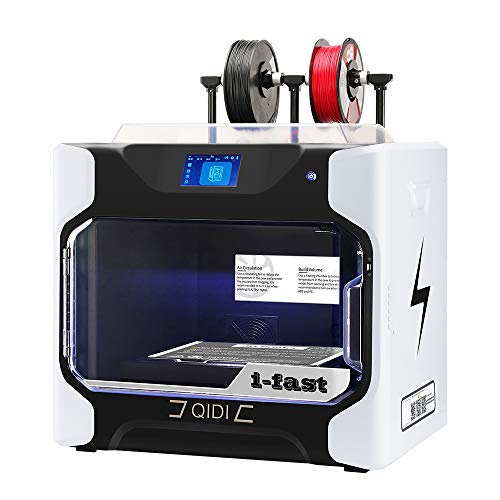
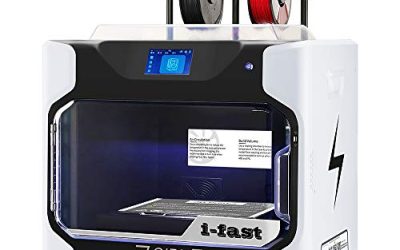
The QIDI i-Fast suits a small team that prints large, complex parts and wants soluble supports to handle overhangs and internal features without manual cleanup. Its large build area gives jigs, housings, and multi-part assemblies room to print in fewer jobs, and the automatic dual extruder adjusts the left and right extruder height through the software, which keeps the idle nozzle clear of the part being printed. The heated chamber supports engineering materials that warp in an open frame, so the machine fits prototyping work that moves from PLA concept models to tougher functional parts in the same week.
Specs
- Dual extruder with automatic height adjustment for the left and right extruders
- Printing size of 330 x 250 x 320 mm
- Industrial grade structure
- Heated chamber up to 60C
- High-temperature all-metal extruder
- Supports PVA water-soluble filament for complex parts
- Prints PLA, PLA Plus, ABS, PETG, and nylon
- Model number IFAST2101
Best for: Large multi-material parts and housings that need soluble supports and a heated chamber.
Watch out for: Confirm the chamber and bed setup for your filament before ordering, and check that your slicer profile assigns the support material to the correct extruder.
FlashForge Creator Pro 2 3D Printer
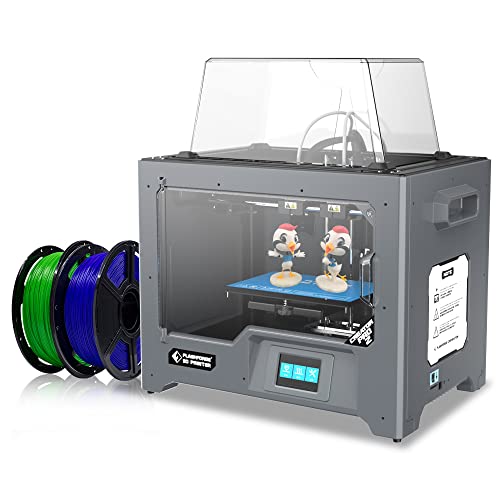
The FlashForge Creator Pro 2 suits a small team that needs more parts per day from a compact enclosed machine. Its independent dual extruder system runs four print modes, so a team can print in two colours, run two materials, duplicate a part, or mirror a part without buying a second printer. The enclosed chamber and heated platform suit ABS work, and the touchscreen keeps job starts simple on a shared bench. Two spools of PLA filament are included in the box, so a team can run a first duplicate job and learn the mode settings without waiting for a separate filament order.
Specs
- Independent dual extruder system with 2 extruders
- Build volume of 200 x 148 x 150 mm, with mirror mode at 80 x 148 x 150 mm and duplicate mode at 95 x 148 x 150 mm
- Extruder diameter of 0.4 mm
- Highest set temperature of extruder of 240C
- Highest set temperature of platform of 120C
- Print speed of 10 to 100 mm per second
- 3.5 inch touch screen
- Printer dimensions of 526 x 360 x 403 mm
- Supports PLA, Pearl PLA, PVA, ABS, ABS Pro, and HIPS
- Includes 2 free spools of PLA filament, 1 kg per spool
Best for: Small-batch duplicate and mirror printing of compact parts on a shared workbench.
Watch out for: Measure your parts against the duplicate-mode volume before buying, since each copy gets a smaller footprint than the full build volume.
Which One Fits Your Situation
You Print Large Parts With Internal Channels
Choose the QIDI i-Fast. Its 330 x 250 x 320 mm build area fits housings and jigs that the smaller enclosed machine cannot take in one job, and PVA soluble support lets internal passages and deep overhangs print cleanly. The heated chamber also helps larger ABS and nylon parts hold their shape. For a team whose bottleneck is part size and support removal, the larger dual-extruder machine is the direct answer.
You Need Two Copies of Every Bracket
Choose the FlashForge Creator Pro 2. Duplicate mode prints two copies of the same part side by side, which doubles throughput for brackets, clips, and spacers without a second machine or a second operator. Mirror mode adds left-handed and right-handed pairs in one run. Keep parts inside the duplicate-mode footprint, and the machine turns a full day of repeat jobs into a much shorter queue.
Your Bench Space Is Tight and Shared
Choose the FlashForge Creator Pro 2. Its enclosed body and 526 x 360 x 403 mm footprint fit a crowded bench, and the touchscreen lets any trained team member start a job without moving a laptop next to the machine. The enclosed chamber also keeps ABS fumes and drafts contained while parts print. For a team sharing one bench between assembly and printing, the compact enclosed design earns its place.
You Prototype in Engineering Materials
Choose the QIDI i-Fast. The heated chamber, high-temperature all-metal extruder, and support for ABS, PETG, and nylon cover functional prototypes that PLA alone cannot prove out. Soluble PVA support means a prototype with complex geometry can come off the bed ready for fitting instead of spending an hour under hand tools. Teams moving from concept models to end-use test parts will use that range every week.
Common Mistakes
- Buying on headline build volume alone, then finding that duplicate or mirror mode gives each part a much smaller footprint.
- Choosing a dual-extrusion printer without checking whether the listing states soluble support compatibility, then hand-removing supports from every complex part.
- Slicing a two-material job without assigning each extruder its own material and temperature, which leads to failed first layers and wasted filament.
- Storing PVA support filament open on a shelf, where it absorbs moisture and then prints with stringing and weak layer bonds.
- Placing a printer on a bench with no clearance for the door, spool holders, and cables, then discovering the setup needs a second bench after delivery.
Frequently Asked Questions
What is the difference between dual extrusion and IDEX?
Dual extrusion means a printer has two extruders, so it can print two materials or two colours in one job. IDEX means the two extruders move independently on separate carriages, which adds duplicate mode and mirror mode. The FlashForge Creator Pro 2 uses an independent dual extruder system. IDEX suits teams that want two copies at once, while a shared-carriage dual extruder suits two-material parts and soluble supports.
Can a dual-extrusion printer run soluble supports?
Yes, when the listing states support for a soluble material such as PVA. The QIDI i-Fast lists PVA water-soluble filament support, and the FlashForge Creator Pro 2 lists PVA among its supported filaments. Soluble supports dissolve away after printing, which leaves clean overhangs and internal channels. Keep PVA dry before printing, and check that the slicer assigns the support structures to the extruder loaded with PVA.
Does duplicate mode halve the build volume?
Duplicate mode does not halve the full volume, but it does reduce the footprint available to each copy. On the FlashForge Creator Pro 2, the full build volume is 200 x 148 x 150 mm, while duplicate mode gives each part 95 x 148 x 150 mm. Always measure your part against the mode you plan to use before ordering.
Which printer suits a small manufacturing team best?
It depends on the work the team repeats most. The QIDI i-Fast suits larger parts, soluble supports, and engineering materials, thanks to its bigger build area and heated chamber. The FlashForge Creator Pro 2 suits compact repeat parts, because duplicate and mirror modes raise daily output. Teams printing housings should lean toward the QIDI i-Fast, while teams printing brackets should lean toward the FlashForge Creator Pro 2.