Key takeaways
- Compare dual-extrusion FDM printers for educational labs: IDEX and dual-nozzle models with soluble supports, duplication modes and enclosed build areas.
A dual-extrusion printer earns its place in a teaching lab only if the second nozzle solves a real coursework problem: soluble supports that wash away from complex student models, two-material parts in a single run, or duplicated prints that halve the queue before a deadline. The wrong purchase is a machine whose dual mode shrinks the build area too far, or whose nozzle temperature ceiling locks the class out of the filaments on the syllabus.
This guide is for lab managers, technology teachers, and university technicians equipping educational labs. Every pick below is an FDM printer whose Amazon listing publishes dual extrusion, and the specifications quoted come from those product pages, so you can match each machine to your bench space and course plan.
Quick Picks
As an Amazon Associate we earn from qualifying purchases
| Product | Best for | Key spec from title |
|---|---|---|
| QIDI TECHNOLOGY i-Fast | Engineering labs printing soluble supports | Dual extruder, super large 360 x 250 x 320 mm size |
| TENLOG TL-D3 Pro | Class sets printed in duplication mode | 300 degree high temperature nozzle, 11.8 x 11.8 x 13.8 in |
| Flashforge Creator Pro 2 | A first enclosed dual-extruder for a school bench | Independent dual extruder system, 2 spools of PLA included |
How to Choose
Independent Carriages Versus a Shared Dual-Nozzle Head
Two architectures hide behind the words dual extrusion. IDEX machines carry each extruder on its own carriage, so the idle nozzle parks clear of the part and the pair can run duplication or mirror modes. Lifting dual-nozzle designs keep both hotends on one carriage and raise whichever is inactive, which suits two-material printing but cannot print two parts at once. For a lab, the distinction decides whether the machine doubles throughput for a class set or simply adds a support material. Check which system the listing describes before assuming duplication mode is available for deadline week.
Build Volume in Dual Mode, Not Single Mode
Headline build volumes are almost always measured with one extruder working. Switch to dual extrusion and the usable width drops, because both carriages or nozzles need travel room at the edges. A printer advertised at 360 mm wide may offer 330 mm in dual mode, and smaller desktop machines lose proportionally more. Match the dual-mode figure against the largest model on your syllabus, including any support structures around it. If student projects regularly approach the limit, step up a size rather than discovering the constraint midway through a assessed print run.
Nozzle Temperature, Chamber Heat, and Support Materials
The educational case for dual extrusion usually rests on PVA, the water-soluble support filament that lets students print overhangs and internal cavities, then dissolve the scaffolding in water. PVA pairs with PLA at modest temperatures, but engineering courses quickly reach for ABS, PETG, or nylon blends, and those demand more: nozzle ceilings of 300 degrees or higher, a heated bed, and ideally an enclosed or heated chamber to stop ABS warping across a long print. Read the listing’s published temperature limits and chamber description, and confirm the filament list includes the exact support and model materials your course teaches.
Supervision, Noise, and Bench Practicality in a Shared Lab
A lab printer runs around people, often for hours, so the listing’s practical details matter as much as its print specs. Enclosed frames with covers contain heat and keep fingers away from moving carriages, a genuine consideration with younger students. A built-in camera lets staff check a long job from another room instead of hovering. Silent driver boards keep an open-frame machine tolerable in a classroom during lessons. Finally, weigh the footprint and the power supply rating: a large-format machine with a 600W supply needs a dedicated bench position and a circuit that can carry it alongside the rest of the lab’s equipment.
The 3 Best Options
QIDI TECHNOLOGY i-Fast
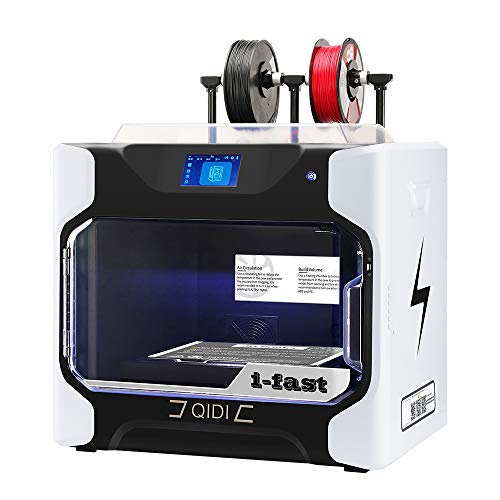
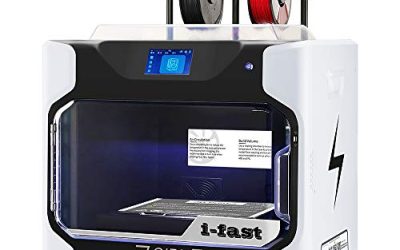
The i-Fast is the pick for labs whose coursework goes beyond PLA trinkets. Its automatic dual extruder lifts the idle nozzle under software control, so students can pair a model filament with PVA soluble support and produce geometries that would fail on a single-nozzle machine. The listing adds a heated chamber rated to 60 degrees and a high-temperature dual extruder set reaching 350 degrees, which opens the door to nylon and other engineering filaments. A built-in camera supports remote checks on long jobs, and the large dual-mode build area swallows degree-show models and multi-part assemblies.
Specs
- Dual extruder system with automatic nozzle lifting; dual-mode print size 330 x 250 x 320 mm, single-extruder size 360 x 250 x 320 mm
- Heated chamber up to 60 degrees for warp-prone materials
- High-temperature dual extruder set; maximum extruder temperature 350 degrees
- Second-generation dual Z-axis structure with linear guides on all axes
- Filaments named in the listing: PLA, PLA+, ABS, PETG, NYLON, plus PVA water-soluble support
- Built-in camera for print monitoring; 5-inch color touchscreen
- Item model number: IFAST2101
Best for: Engineering and advanced technology labs printing soluble-support coursework in engineering filaments.
Watch out for: The 360 mm headline width applies to single-extruder mode only, and the listing covers more than one extruder configuration, so confirm the dual-mode dimensions and which extruder set the offered unit ships with.
ASIN: B08S3B6C54
TENLOG TL-D3 Pro

The TL-D3 Pro suits teaching labs that need height and throughput more than engineering temperatures. Its two extruders ride on independent carriages, and the listing’s duplication and mirror modes let one machine turn out a matched pair of student parts in a single run, which is exactly the bottleneck a class of twenty creates. The 300 mm square bed and 350 mm height take tall coursework models that compact enclosed printers cannot, while the 300 degree nozzle ceiling still covers PVA supports, TPU, ABS, and nylon. A silent motherboard keeps the open frame classroom-friendly during lessons.
Specs
- Independent dual extruders (IDEX) with dual material, duplication, and mirror printing modes
- Build volume 300 x 300 x 350 mm (11.8 x 11.8 x 13.8 in)
- Nozzle temperature up to 300 degrees
- Direct drive extruders with a 600W power supply
- Self-developed silent motherboard for quieter operation
- Upgraded borosilicate glass print bed
- Filaments named in the listing: PVA, TPU, ABS, PLA, Nylon
- Filament runout detection and power loss recovery
Best for: School and college labs printing tall models and paired class parts in duplication mode.
Watch out for: The open frame has no enclosure, so ABS jobs need a draft-free corner and ventilation planning; bed leveling is manual, and listings exist in more than one driver-board variant, so verify the exact configuration offered.
ASIN: B07T99ZK4K
Flashforge Creator Pro 2
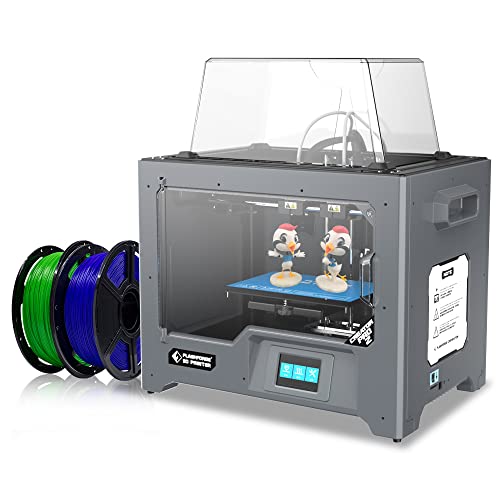
The Creator Pro 2 is the sensible first dual-extrusion machine for a school bench. It is a true IDEX design in a compact enclosed body: a metal frame with acrylic covers keeps the print area contained around younger students, and the independent extruders still deliver mirror printing and two-color or two-material work. The listing bundles two 1 kg spools of PLA, so a department can start printing the day the machine lands. Its build area and 240 degree temperature ceiling are modest, which is precisely why it fits introductory courses built around PLA and PVA rather than engineering filaments.
Specs
- Independent dual extruder system (IDEX) with mirror printing
- Build volume 200 x 148 x 150 mm
- Extruder quantity: 2; nozzle diameter 0.4 mm
- Maximum extruder temperature 240 degrees
- Filaments named in the listing: PLA, Pearl PLA, PVA, ABS, ABS Pro, HIPS
- Metal frame structure with acrylic covers and optimized build platform
- Includes 2 spools of PLA filament, 1 kg per spool
Best for: Introductory school labs adding dual extrusion and soluble supports on a single bench.
Watch out for: The 240 degree nozzle ceiling rules out nylon coursework, and the small build area shrinks further in dual mode, so measure your largest class model before committing a whole department to it.
ASIN: B08GJ44T6Q
Which One Fits Your Situation
Your Course Teaches Engineering Filaments and Soluble Supports
Choose the QIDI TECHNOLOGY i-Fast. It is the only machine here whose listing publishes a heated chamber and a 350 degree high-temperature extruder set, and its automatic dual extruder is documented for precision work with water-soluble PVA. Nylon coursework, ABS assemblies, and complex supported geometries all sit inside its published envelope, and the built-in camera helps staff supervise the long prints those materials demand.
A Whole Class Needs the Same Part by Tomorrow
Choose the TENLOG TL-D3 Pro and run it in duplication mode. Independent carriages print two identical parts at once, which effectively doubles the machine during the pre-deadline rush, and mirror mode covers paired left-and-right components without extra CAD work. The tall, wide bed also means most student parts fit without splitting. No other pick here offers the same combination of duplication throughput and build height for class sets.
You Are Buying a First Dual-Extrusion Printer for a School
Choose the Flashforge Creator Pro 2. The enclosed metal frame and acrylic covers suit rooms with younger students, the bundled PLA spools remove a separate first order, and the IDEX system still teaches the core skills: two-color printing, mirror mode, and PVA supports with PLA. Its limits only bite when a course moves past introductory materials, at which point it remains a useful second machine.
Bench Space Is Tight and Print Height Matters More Than Width
Choose the TENLOG TL-D3 Pro. Its footprint is that of a standard open-frame desktop machine, yet the listing publishes 350 mm of build height, the most vertical room in this group. Tall coursework such as architectural models, rocket bodies, and stacked assemblies fits without sectioning, and the glass bed and direct drive extruders handle the PLA and PETG those projects usually specify.
Common Mistakes
- Comparing headline build volumes instead of the smaller dual-mode volume, then finding the class model does not fit with both extruders active.
- Buying a printer with a 240 degree nozzle ceiling for a syllabus that includes nylon or polycarbonate coursework.
- Assuming every dual-extrusion printer can duplicate parts, when only independent-carriage designs offer duplication and mirror modes.
- Loading PVA support filament without a dry storage plan, even though PVA absorbs moisture quickly and then prints poorly.
- Placing an open-frame printer in a drafty classroom corner and blaming the machine for warped ABS prints.
Frequently Asked Questions
What can students print with dual extrusion that a single nozzle cannot?
Two things matter in coursework. First, soluble PVA supports let students print overhangs, bridges, and internal cavities, then dissolve the scaffolding in water for a clean part. Second, two model materials or colors can combine in one print, such as a rigid PLA body with TPU grips. Independent-carriage machines add duplication and mirror modes on top, which single-nozzle printers cannot offer at all.
Does an educational lab need IDEX, or is any dual nozzle enough?
If the goal is only a support material beside a model material, a shared dual-nozzle head does the job. IDEX earns its keep when the lab also wants duplication or mirror printing for class sets, and when the idle nozzle parking away from the part reduces ooze marks on assessed work. Most labs that run both coursework and deadline batches benefit from the independent carriages.
Can these printers run during lessons without disturbing the class?
Enclosed models such as the Creator Pro 2 and i-Fast contain much of their operating noise behind covers, and the TL-D3 Pro’s listing specifies a silent motherboard despite its open frame. None of them is silent, so position any of them away from the main teaching wall, and schedule the longest jobs outside lesson hours where the timetable allows.
Which filaments should a lab stock first for dual extrusion?
Start with PLA as the model material and PVA as its soluble partner, since that pairing covers most introductory dual-extrusion coursework and prints at moderate temperatures on all three machines here. Add PETG for stronger functional parts. Keep PVA sealed and dry between sessions, because it absorbs moisture from the air and degrades noticeably once damp.