Our Short List of 3

- Best for: Gamers who want a high-end prebuilt tower for 1440p and 4K play.
- Processor: AMD Ryzen 7 9700X
- Graphics: RX 9070 XT 16GB
- Memory: 32GB DDR5
- Storage: 1TB SSD

- Best for: Budget buyers who want a tower they can upgrade over time.
- Processor: AMD Ryzen 5
- Graphics: AMD Radeon RX 580
- Memory: 8GB, upgradable to 64GB
- Storage: 240GB SSD plus 2TB HDD, upgradable to 2TB SSD plus 2TB HDD

- Best for: Gamers who play demanding titles and want a fast processor with roomy storage.
- Processor: AMD Ryzen 7 9800X3D
- Graphics: NVIDIA RTX 5070
- Memory: 32GB DDR5 6000
- Storage: 2TB Gen4 NVMe SSD
All 5 Picks at a Glance
| Product | Specs | Action |
|---|---|---|
| 1. KOTIN Gaming PC, Ryzen 7 9700X, RX 9070 XT |
| Check price on Amazon |
| 2. CyberPowerPC Gamer Master Desktop, Ryzen 5, RX 580 |
| Check price on Amazon |
| 3. Skytech Blaze 5 Gaming PC Desktop, Ryzen 7 9800X3D, RTX 5070 |
| Check price on Amazon |
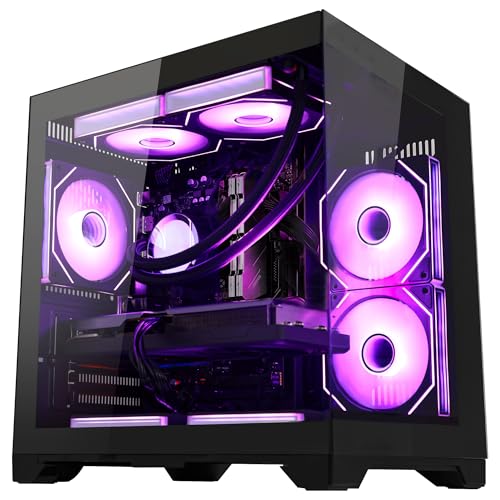 4. HELLOLAND Gaming Desktop PC, Ryzen 5 9600X, RX 9060XT |
| Check price on Amazon |
 5. Velztorm Mini Pilum Custom Built Gaming Desktop PC, Ryzen 7 5700X, RTX 5060 |
| Check price on Amazon |
Key takeaways
- Compare five gaming desktop PCs, from a budget upgradable tower to a high-end liquid-cooled build, and pick the desktop that fits your games and room.
A gaming desktop PC is a complete tower built for play, and the right one depends less on the loudest specification than on how its processor, graphics card, memory, and storage fit the games you actually run. A tower that handles competitive shooters may struggle with demanding open-world titles, while a high-end build can be more machine than a casual player ever uses. The listings in this guide all state desktop form and gaming use in their own wording, so every pick is a tower made for gaming rather than a laptop, a console, or a bare component.
This guide compares five prebuilt and custom-built gaming desktops from five different makers, ranging from an upgradable budget tower to a liquid-cooled high-end build. Each section reports only what the listing states, including processor, graphics, memory, storage, cooling, and power supply wording, and flags anything the listing leaves unstated. Use the buying guidance to match a tower to your games, your monitor, and the space on or under your desk.
Quick Picks
As an Amazon Associate we earn from qualifying purchases.
| Product | Best for | Key spec from title |
|---|---|---|
| KOTIN Gaming PC | High-end 1440p and 4K play | Ryzen 7 9700X, RX 9070 XT 16GB, 32GB DDR5 |
| CyberPowerPC Gamer Master Desktop | Budget buyers who plan upgrades | Ryzen 5, RX 580, RAM upgradable to 64GB |
| Skytech Blaze 5 Gaming PC Desktop | Demanding games on a fast processor | Ryzen 7 9800X3D, RTX 5070, 32GB RAM |
| HELLOLAND Gaming Desktop PC | Mid-range play with liquid cooling | Ryzen 5 9600X, RX 9060XT 16GB, 240mm liquid cooler |
| Velztorm Mini Pilum Gaming Desktop PC | Custom-built tower for everyday gaming | Ryzen 7 5700X, RTX 5060, 32GB DDR4 |
How to Choose
Match the Processor and Graphics Card to Your Games
Start with the two parts that decide how a game runs: the processor and the graphics card. Listings in this guide name both, from a Ryzen 5 paired with an RX 580 at the budget end to a Ryzen 7 9800X3D paired with an RTX 5070 and a Ryzen 7 9700X paired with an RX 9070 XT at the top. Competitive and older titles run well on modest pairings, while recent open-world and ray-traced games ask for stronger graphics. Read the exact processor and graphics wording in each listing rather than trusting a series name alone, because similarly named towers can carry very different parts. If a listing does not state a part, treat it as unknown.
Read Memory and Storage as Stated, Not as Assumed
Memory and storage decide how smoothly a desktop loads games and how many titles it holds. The towers here state 8GB, 16GB, or 32GB of memory and storage from 240GB plus a 2TB hard drive up to 2TB of solid-state storage, and one listing states that its memory can be upgraded to 64GB. More memory helps when games and background programs run together, and larger solid-state storage holds more large modern games. Check whether the listing states solid-state storage, a hard drive, or both, and whether an upgrade path is stated. Do not assume a tower accepts more memory or storage than its listing says.
Weigh Cooling and the Power Supply Together
Cooling and the power supply work as a pair: stronger parts produce more heat and draw more power. The listings here state air cooling, 120mm and 240mm liquid coolers, a 360mm liquid cooler, and a 360 ARGB all-in-one unit, with power supplies from 550W class units up to 850W gold-rated units. A liquid cooler suits a tower that will run demanding games for long sessions, while air cooling suits lighter loads. Read the wattage and rating wording exactly as stated, and check that the cooling type matches the parts inside. A listing that states neither cooling type nor power supply leaves two important details unstated.
Check Connectivity, Size, and the Operating System
A gaming desktop also needs the right connections, a case that fits your space, and an operating system you can use on arrival. The listings here state Wi-Fi generations from Wi-Fi 4 to Wi-Fi 7, Bluetooth on some models, USB counts on one model, and Windows 11 or Windows 11 Pro. Towers in this guide range from compact custom builds to full towers with large coolers, so measure the space where the tower will sit before ordering. Confirm the operating system wording, the wireless wording, and the port wording in the listing itself, and flag any of these as unstated when the listing is silent.
The 5 Best Options
1. KOTIN Gaming PC, Ryzen 7 9700X, RX 9070 XT
- Best for: Gamers who want a high-end prebuilt tower for 1440p and 4K play.
- Processor: AMD Ryzen 7 9700X
- Graphics: RX 9070 XT 16GB
- Memory: 32GB DDR5
- Storage: 1TB SSD
Gamers who want a high-end prebuilt tower for 1440p and 4K play.
The listing does not state a monitor, keyboard, or mouse in the wording reviewed, so confirm what is included before ordering.
The KOTIN tower sits at the top of this guide, pairing a Ryzen 7 9700X processor with an RX 9070 XT graphics card carrying 16GB of video memory, plus 32GB of DDR5 memory and 1TB of SSD storage. Its listing adds an 11.3-inch smart display, a 360mm liquid cooler, Wi-Fi 7, an 850W gold power supply, Windows 11, ARGB lighting, and 1440p and 4K wording for demanding play at higher resolutions. The smart display and liquid cooling set it apart from the other towers here, but confirm both on the exact listing rather than assuming anything beyond what is written.
Watch out for: The listing does not state a monitor, keyboard, or mouse in the wording reviewed, so confirm what is included before ordering.
2. CyberPowerPC Gamer Master Desktop, Ryzen 5, RX 580
- Best for: Budget buyers who want a tower they can upgrade over time.
- Processor: AMD Ryzen 5
- Graphics: AMD Radeon RX 580
- Memory: 8GB, upgradable to 64GB
- Storage: 240GB SSD plus 2TB HDD, upgradable to 2TB SSD plus 2TB HDD
Budget buyers who want a tower they can upgrade over time.
The listing wording reviewed does not state cooling type, power supply wattage, or wireless connectivity, so confirm those details on the exact listing.
The CyberPowerPC Gamer Master is the budget tower in this guide, and its main strength is the upgrade room its listing states outright: memory upgradable to 64GB and storage upgradable to 2TB of SSD plus 2TB of hard drive storage. As listed it carries a Ryzen 5 processor, 8GB of memory, a 240GB SSD plus a 2TB hard drive, an AMD Radeon RX 580 graphics card, and Windows 11, in a prebuilt gaming desktop computer form. That starting specification suits lighter and older games, with the stated upgrade path as the route to heavier titles. Treat the upgrade wording as the plan, not as performance the tower already delivers.
Watch out for: The listing wording reviewed does not state cooling type, power supply wattage, or wireless connectivity, so confirm those details on the exact listing.
3. Skytech Blaze 5 Gaming PC Desktop, Ryzen 7 9800X3D, RTX 5070
- Best for: Gamers who play demanding titles and want a fast processor with roomy storage.
- Processor: AMD Ryzen 7 9800X3D
- Graphics: NVIDIA RTX 5070
- Memory: 32GB DDR5 6000
- Storage: 2TB Gen4 NVMe SSD
Gamers who play demanding titles and want a fast processor with roomy storage.
The listing wording reviewed does not state Bluetooth, so confirm Bluetooth separately if a wireless headset or controller depends on it.
The Skytech Blaze 5 pairs a Ryzen 7 9800X3D processor with an RTX 5070 graphics card, 32GB of memory, and 2TB of Gen4 NVMe SSD storage, which makes it the strongest processor-and-graphics pairing for demanding games in this guide after the KOTIN tower. Its listing also states DDR5 6000 memory, an 850W gold ATX 3 power supply, a 360 ARGB all-in-one cooler, Wi-Fi 5, Windows 11, and the Blaze 5 series name. The combination of a fast gaming processor, a large solid-state drive, and a 360mm cooler describes a tower built for long sessions on demanding titles, with the exact series and specification wording to match on the listing.
Watch out for: The listing wording reviewed does not state Bluetooth, so confirm Bluetooth separately if a wireless headset or controller depends on it.
4. HELLOLAND Gaming Desktop PC, Ryzen 5 9600X, RX 9060XT
- Best for: Mid-range gamers who want liquid cooling and a large video memory capacity.
- Processor: AMD Ryzen 5 9600X, 6-core, 3.9GHz
- Graphics: AMD RX 9060XT 16GB
- Memory: 32GB DDR5 RAM
- Storage: 1TB PCIe SSD
Mid-range gamers who want liquid cooling and a large video memory capacity.
The listing wording reviewed does not state a monitor or peripherals, so confirm what ships in the box before ordering.
The HELLOLAND tower occupies the middle of this guide, with a Ryzen 5 9600X six-core processor running at 3.9GHz, an RX 9060XT graphics card with 16GB of video memory, 32GB of DDR5 memory, and 1TB of PCIe SSD storage. Its listing adds Wi-Fi and Bluetooth, a 650W power supply, a 240mm liquid cooler with ARGB fans and software control, Windows 11, and a black finish. The liquid cooler and 16GB graphics card are the features that set it apart from air-cooled towers at a similar level, while the stated processor speed and core count give a concrete basis for comparing it with the other towers here.
Watch out for: The listing wording reviewed does not state a monitor or peripherals, so confirm what ships in the box before ordering.
5. Velztorm Mini Pilum Custom Built Gaming Desktop PC, Ryzen 7 5700X, RTX 5060
- Best for: Gamers who want a custom-built tower with Windows 11 Pro for everyday play.
- Processor: AMD Ryzen 7 5700X
- Graphics: GeForce RTX 5060
- Memory: 32GB DDR4
- Storage: 1TB PCIe SSD
Gamers who want a custom-built tower with Windows 11 Pro for everyday play.
The listing states Wi-Fi 4, an older wireless generation than the other towers here, so a wired connection suits it best for online play.
The Velztorm Mini Pilum is the custom-built tower in this guide, and its listing states a Ryzen 7 5700X processor, a GeForce RTX 5060 graphics card, 32GB of DDR4 memory, 1TB of PCIe SSD storage, a 120mm all-in-one cooler, a 750W power supply, Wi-Fi 4, RJ-45, HDMI, and Windows 11 Pro. The word Mini in its model name describes the model line, not a mini-PC form: the listing itself states a gaming desktop PC form. Its specification sits between the budget CyberPowerPC tower and the stronger Skytech and KOTIN builds, with Windows 11 Pro and wired networking wording that suit a desk setup with an Ethernet connection.
Watch out for: The listing states Wi-Fi 4, an older wireless generation than the other towers here, so a wired connection suits it best for online play.
Which One Fits Your Situation
A First Gaming Tower on a Tight Budget
Choose the CyberPowerPC Gamer Master if the starting spend matters most and an upgrade path matters more than day-one power. Its listing states the memory and storage upgrades outright, so the tower can grow with heavier games later. Confirm the cooling, power supply, and wireless details the listing leaves unstated, and plan the first upgrades around the games you play most.
A Desk Setup for Demanding Games at Higher Resolutions
Choose the KOTIN tower or the Skytech Blaze 5 if demanding games at 1440p or 4K are the priority. The KOTIN build adds a smart display and Wi-Fi 7 alongside its 360mm liquid cooler, while the Blaze 5 pairs a fast gaming processor with 2TB of fast storage. Compare their graphics cards and cooling directly, and measure the space each tower needs.
A Mid-Range Tower with Liquid Cooling
Choose the HELLOLAND desktop if liquid cooling and 16GB of video memory matter at a mid-range level. Its 240mm cooler with software-controlled ARGB fans and its stated processor speed give a clear picture of what the tower offers. Confirm the included accessories on the listing, since the wording reviewed does not state a monitor or peripherals.
A Custom-Built Tower with Wired Networking
Choose the Velztorm Mini Pilum if a custom-built tower with Windows 11 Pro and an Ethernet port fits the desk setup. Its wired RJ-45 wording suits online play where Wi-Fi 4 would be a weak point, and its specification covers everyday gaming without high-end extras. Check the case dimensions against the space available before ordering.
Common Mistakes
- Buying a tower by its series name alone without reading the exact processor and graphics wording in the listing.
- Assuming a listing includes a monitor, keyboard, or mouse when the listing does not state them.
- Confusing a mini-PC or a bare case with a complete gaming desktop tower.
- Ignoring cooling and power supply wording when choosing a tower for demanding games.
- Treating an upgrade path stated in a listing as performance the tower already delivers.
Frequently Asked Questions
What makes a desktop PC a gaming desktop?
A gaming desktop is a complete tower whose listing states gaming use alongside desktop form, with a processor and graphics card suited to games. Every pick in this guide states both desktop form and gaming wording in its listing, which separates these towers from office desktops, laptops, consoles, and bare components.
Do I need liquid cooling for a gaming desktop?
Liquid cooling suits towers that run demanding games for long sessions, and three towers here state liquid or all-in-one cooling. Air cooling suits lighter loads and shorter sessions. Read the cooling type stated in each listing, and match it to how long and how hard the tower will run.
How much memory and storage should a gaming desktop have?
The towers here state 8GB to 32GB of memory and 240GB plus a hard drive up to 2TB of storage. More memory helps when games and other programs run together, and larger solid-state storage holds more large games. Check the exact figures in the listing, and check whether an upgrade path is stated.
Can I upgrade a prebuilt gaming desktop later?
Some prebuilt towers state upgrade room and some do not. The CyberPowerPC listing in this guide states memory upgradable to 64GB and storage upgradable to 2TB of SSD plus 2TB of hard drive storage. For any other tower, confirm upgrade wording on the exact listing before assuming parts can be added.